WhatsApp message templates: All your WhatsApp templates, in one place.
Build WhatsApp message templates with a live preview, submit them to Meta and see what’s approved, in review or rejected, all in one library. Use them in campaigns, journeys and the inbox. You can even create them by asking ChatGPT or Claude.
20% off
Illustrative example
The basics
What are WhatsApp message templates?
Every campaign, reminder and follow-up you send outside an open chat uses one. Getting them approved is often the slowest part of using WhatsApp for business.
- WhatsApp message template
- A WhatsApp message template is a pre-approved message format that businesses must use to start a conversation, or to message a customer more than 24 hours after their last reply. Each template is reviewed by Meta and belongs to a category: marketing, utility or authentication. Templates can include variables, media and buttons.
Why WhatsApp templates get rejected
These are the most common reasons. When you create templates with ChatGPT or Claude, SAMWAD checks each draft for problems like these before anything goes to Meta.
Anatomy
The four parts of a WhatsApp template.
are here
- 1HeaderOptional. Text, or an image, video or document such as a brochure or invoice.
- 2BodyThe main message, with variables like {{1}} for the customer’s name, order number or date.
- 3FooterOptional short line, such as an opt-out note for marketing messages.
- 4ButtonsQuick replies like “Talk to us”, or links and call buttons like “Shop now”.
Template management
How template management works in SAMWAD.
One library for every template your business uses, whether your team built it in SAMWAD or created it with ChatGPT or Claude.
Or just ask AI
Create WhatsApp templates in ChatGPT or Claude, in four steps.
Connect SAMWAD
Add the SAMWAD connector in ChatGPT or Claude and sign in to your SAMWAD account. Our team can help you set it up.
Describe the message
Say what you want to send, in plain words. Paste an old message or an image to work from if you have one.
Review the draft
The draft is saved in SAMWAD and checked against WhatsApp’s rules. You see a WhatsApp-style preview right in the chat, and can ask for changes.
Submit and track
Say “submit” and it goes to Meta for review. Ask for the status anytime, or open it in the SAMWAD app.
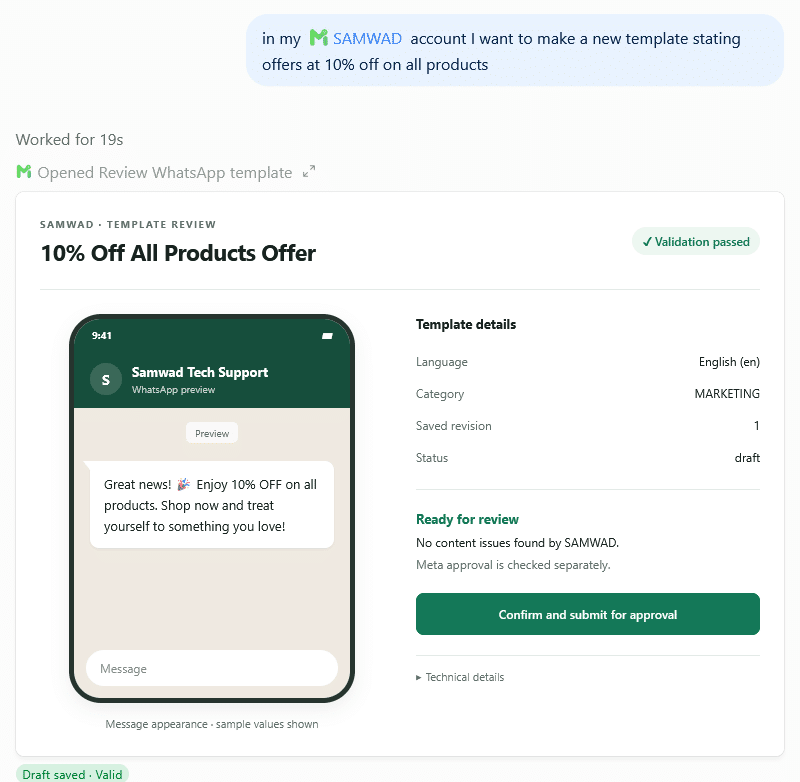
Real screenshot from ChatGPT
Illustrative
Prompts that work
What you can ask ChatGPT or Claude.
No template jargon needed. Ask the way you’d brief a colleague.
Turn this offer into a marketing template with an image and a Shop now button.Writes the template, picks the category and adds the buttons.
This template was rejected. Fix it so it passes.Reads the reason, rewrites the problem parts and saves a new draft.
Make a utility version for order updates.Keeps it factual so it fits the utility category.
Use this photo as the header.Uploads the image to SAMWAD and attaches it to the template.
Which of my templates are still in review?Checks approval status for your templates.
Set up a campaign draft with the approved Diwali template.Prepares a campaign draft in SAMWAD for you to review and send.
You stay in control
You approve every template before it goes to Meta.
Nothing goes to Meta without your OK
The assistant saves drafts and shows you a preview. It submits only when you tell it to.
Checked before review
Each draft is checked against WhatsApp’s rules first. Meta still makes the final approval decision.
Saved in your account
Every draft and template lives in your SAMWAD library, where your team can see and edit it.
Pricing
Start creating templates with AI.
Our team helps you pick the right plan and sets everything up with you. Meta’s WhatsApp charges are passed through at cost, with no markup.
Works even better with
All features →FAQ
WhatsApp template FAQs
Want help connecting SAMWAD to ChatGPT or Claude? Our team will set it up with you.
Book a demoWhat is a WhatsApp message template?
It’s a pre-approved message format that businesses must use to start a WhatsApp conversation, or to message a customer more than 24 hours after their last reply. Meta reviews every template, and each one belongs to the marketing, utility or authentication category.
How do I manage WhatsApp templates in SAMWAD?
Build templates in the SAMWAD template builder with a live WhatsApp preview, add an image, video or document header, and submit them to Meta. One library shows every template with its category and approval status, and you can reuse them in campaigns, journeys and the inbox.
Can I create WhatsApp templates with ChatGPT or Claude?
Yes. Connect SAMWAD to ChatGPT or Claude, then describe the message you want. The assistant saves a draft template in your SAMWAD account, checks it against WhatsApp’s rules, shows a preview and submits it to Meta when you confirm.
Will the AI submit templates without asking me?
No. It saves drafts and shows you a preview. A template is only submitted to Meta when you tell it to.
How long does template approval take?
Meta usually reviews templates quickly, but it can take up to 24 hours. You can check the status in SAMWAD or by asking ChatGPT or Claude.
Why do WhatsApp templates get rejected?
Common reasons are the wrong category, variables at the start or end of the message, missing sample values, content against WhatsApp’s policies and formatting problems. SAMWAD checks drafts for problems like these before you submit.
Can I fix a rejected template?
Yes. Ask ChatGPT or Claude to fix it, and it will rewrite the parts that caused the rejection and save a new draft. You can also edit it in the SAMWAD app.
Can templates include images, buttons and personal details?
Yes. Templates can have an image, video or document header, variables like the customer’s name or order number, a footer, and quick-reply or link buttons.
Where can I use my templates?
In campaigns, chatbot journeys and follow-ups, and in the team inbox when a customer’s 24-hour window has closed.
Get started
Set up your WhatsApp templates with our team.
Free trial, help with your first templates, and no markup on Meta charges.
Start free trialFor enterprises
Run WhatsApp at scale, on your terms.
Multiple numbers, on-prem or VPC AI, custom integrations and a priority SLA.
Book a live demo