WhatsApp MCP connector: Run your WhatsApp marketing from ChatGPT or Claude.
The SAMWAD connector lets ChatGPT and Claude work inside your SAMWAD account. Ask in plain words to import contacts, create templates, build journeys, send campaigns and check results. Nothing goes out until you confirm.
The basics
What is a WhatsApp MCP connector?
AI assistants are good at writing and planning, but on their own they can’t touch your business tools. A connector gives them safe access to one tool, with your permission.
- MCP connector
- MCP (Model Context Protocol) is an open standard that lets AI assistants like ChatGPT and Claude connect to other software. A WhatsApp MCP connector links the assistant to a WhatsApp Business API platform, so it can read and act on your contacts, templates, campaigns and results when you ask, inside your own account.
See it work
What you can do from ChatGPT or Claude.
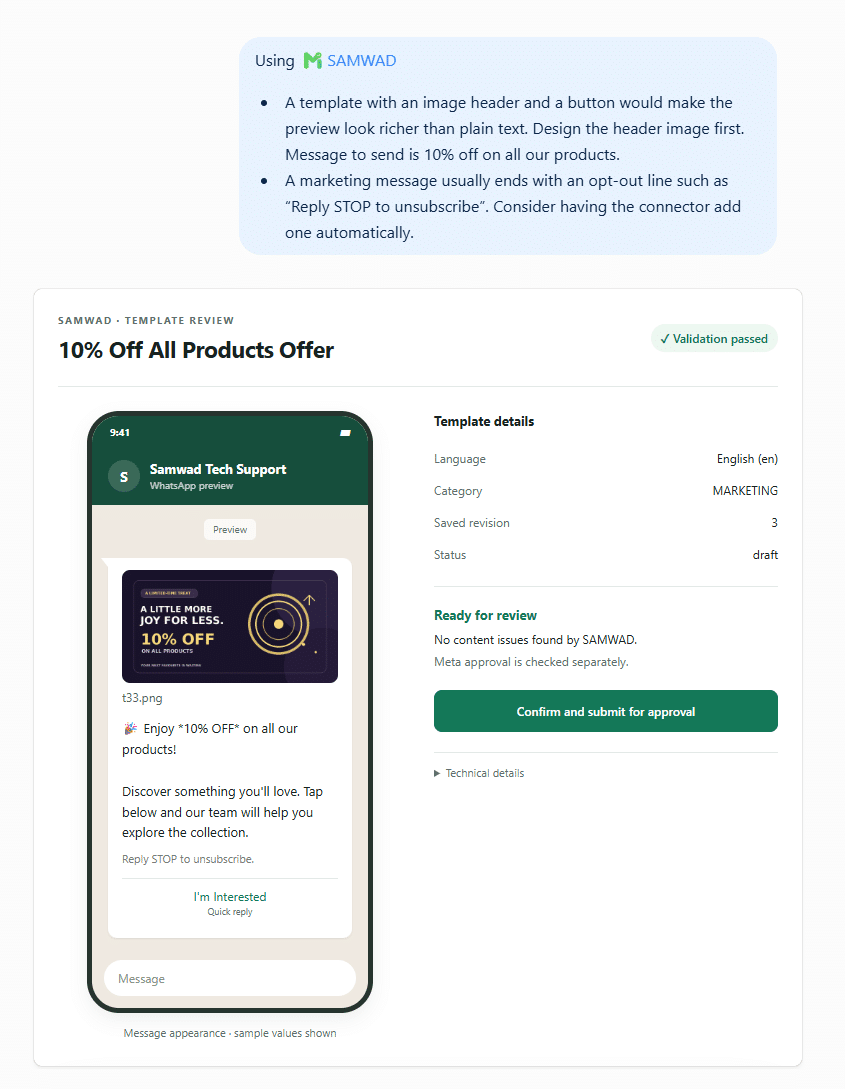
Create a template by describing it.
- Designs the message with an image header, button and opt-out line
- Picks the right category and checks it against WhatsApp’s rules
- Submits to Meta when you confirm
See and organise your contacts.
- Lists your groups with contact counts
- Imports contact lists and creates groups
- Searches and updates contacts

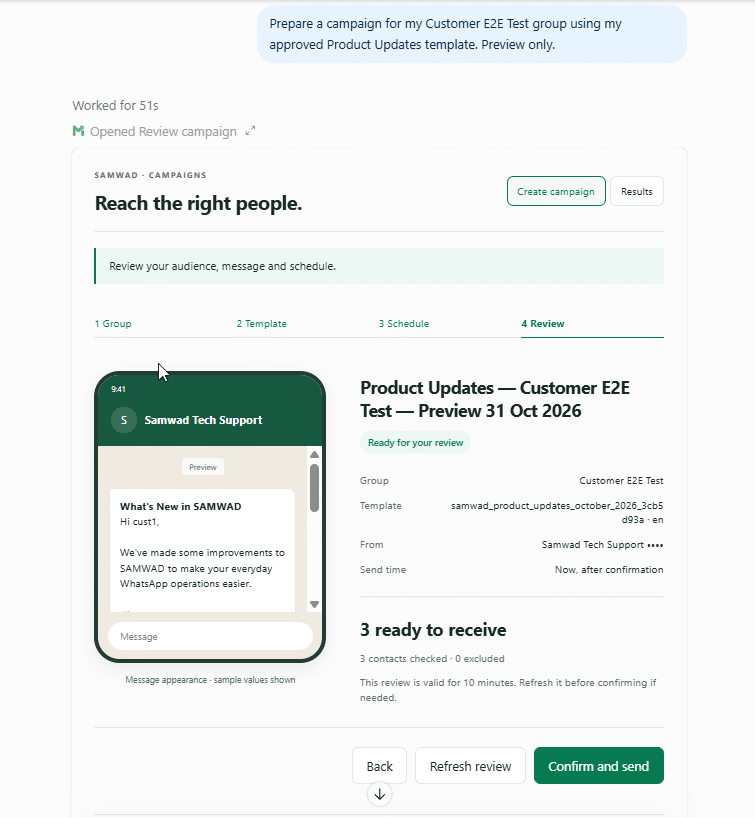
Prepare and send a campaign.
- Builds the campaign from a group and an approved template
- Checks how many contacts are ready to receive it
- Sends only after you click Confirm and send
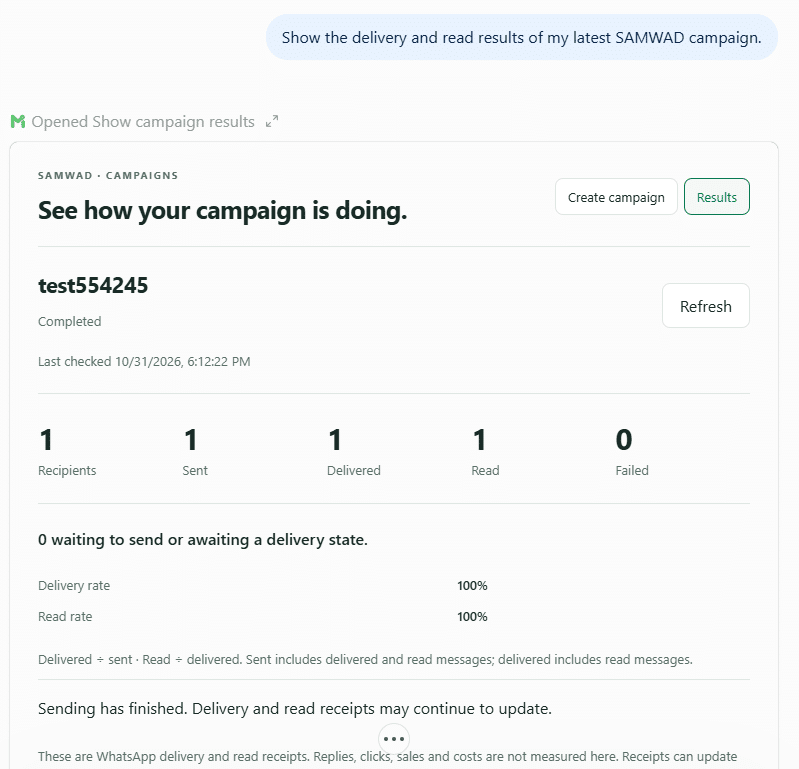
Ask how a campaign did.
- Recipients, sent, delivered, read and failed
- Delivery and read rates
- Refresh as WhatsApp receipts update
Build and test a chatbot journey.
- Drafts the steps from your description
- Simulates a customer going through it
- Turns it on when you’re happy
Capabilities
Everything the connector can work with.
The same SAMWAD account your team uses, reached through a chat.
- Import contact lists
- Search and update contacts and fields
- Create and manage groups
- Draft and edit templates
- Upload header images and media
- Check rules, preview and submit to Meta
- Estimate who will receive it
- Prepare, preview and send campaigns
- Schedule for later
- Build chatbot journeys from a description
- Simulate customer paths
- Review before turning them on
- Campaign analytics and results
- Failure reasons for each message
- Suggested next steps
- Search past conversations when you ask
- Find a customer’s recent chats
- Summarise what was discussed
Setup
Connect SAMWAD to ChatGPT or Claude in three steps.
Find SAMWAD
In ChatGPT, open Apps and search for SAMWAD. In Claude, open Connectors and search for SAMWAD.
Sign in
Connect it to your SAMWAD account. The assistant can only work inside the account you sign in to.
Start asking
Mention SAMWAD in your message, like “In my SAMWAD account, make a template for…”.
You need a SAMWAD account and a ChatGPT or Claude account that can use apps or connectors.
Prompts that work
Things you can ask.
Write the way you’d brief a colleague. No WhatsApp jargon needed.
Import this list and make a group called Expo 2026.Imports the contacts, creates the group and tells you how many are opted in.
Create a utility template for order updates with a Track order button.Drafts it, checks it and shows a preview.
Send the Diwali template to repeat buyers at 6 pm.Counts the audience, then schedules it once you confirm.
Build a journey that answers pricing questions and books a demo.Drafts the journey and simulates a customer path.
Which of my templates were rejected, and why?Lists them with Meta’s reasons and offers to fix them.
How did last week’s campaigns compare?Pulls the results and points out what worked.
You stay in control
You confirm every send and every submission.
Nothing goes out without you
Templates are submitted and campaigns are sent only after you confirm in the chat.
Your account, your rules
The assistant works inside the SAMWAD account you signed in to. WhatsApp’s opt-in and template rules still apply.
Everything stays in SAMWAD
Templates, groups, journeys and campaigns created from a chat appear in the SAMWAD app for your team.
Pricing
Connect SAMWAD to your AI assistant.
Our team helps you pick the right plan and sets everything up with you. Meta’s WhatsApp charges are passed through at cost, with no markup.
Works even better with
All integrations →FAQ
WhatsApp MCP connector FAQs
Want to see it on your own account? We’ll connect it with you on a call.
Book a demoWhat is a WhatsApp MCP connector?
It’s a connection that lets AI assistants like ChatGPT and Claude work with a WhatsApp Business API platform. With the SAMWAD connector, the assistant can manage your contacts, templates, journeys and campaigns, and read results, inside your SAMWAD account.
What does MCP stand for?
Model Context Protocol. It’s an open standard for connecting AI assistants to other software, so they can use that software’s tools when you ask.
Which AI assistants work with SAMWAD?
ChatGPT and Claude. SAMWAD is listed in ChatGPT’s apps and in Claude’s connectors directory.
Can ChatGPT or Claude send WhatsApp campaigns?
Yes. The assistant prepares the campaign, tells you how many opted-in contacts will receive it, and sends or schedules it only after you confirm.
Will it send anything without asking me?
No. Templates are submitted to Meta and campaigns are sent only after you confirm in the chat.
Do I need to know how to code?
No. You write in plain language. Setup is finding SAMWAD in the assistant’s apps or connectors and signing in.
Can my team still use the SAMWAD app?
Yes. Everything created from ChatGPT or Claude, such as templates, groups, journeys and campaigns, appears in the SAMWAD app.
Do WhatsApp’s rules still apply?
Yes. Campaigns go only to opted-in contacts, messages outside the 24-hour window need approved templates, and Meta reviews every template.
What do I need to get started?
A SAMWAD account and a ChatGPT or Claude account that can use apps or connectors.
Get started
Try SAMWAD in ChatGPT or Claude.
Start a free trial, connect SAMWAD in your AI assistant and send your first campaign from a chat.
Start free trialFor enterprises
Run WhatsApp at scale, on your terms.
Multiple numbers, on-prem or VPC AI, custom integrations and a priority SLA.
Book a live demo