Connect WhatsApp to ChatGPT with SAMWAD
SAMWAD is an app in ChatGPT. Once connected, this WhatsApp ChatGPT integration lets you manage your WhatsApp Business account from a chat: see your contact groups, create templates, prepare campaigns and check how they did. Images marked “Real screenshot” are from ChatGPT with SAMWAD connected.
Contacts
See your groups before you plan a send
Ask for your contact groups and ChatGPT lists them with the number of contacts in each, so you can pick the right audience without opening the dashboard.
- Lists your groups with contact counts
- Imports contact lists and creates groups
- Searches and updates contacts and their fields
Templates
Describe a template, review it, then submit
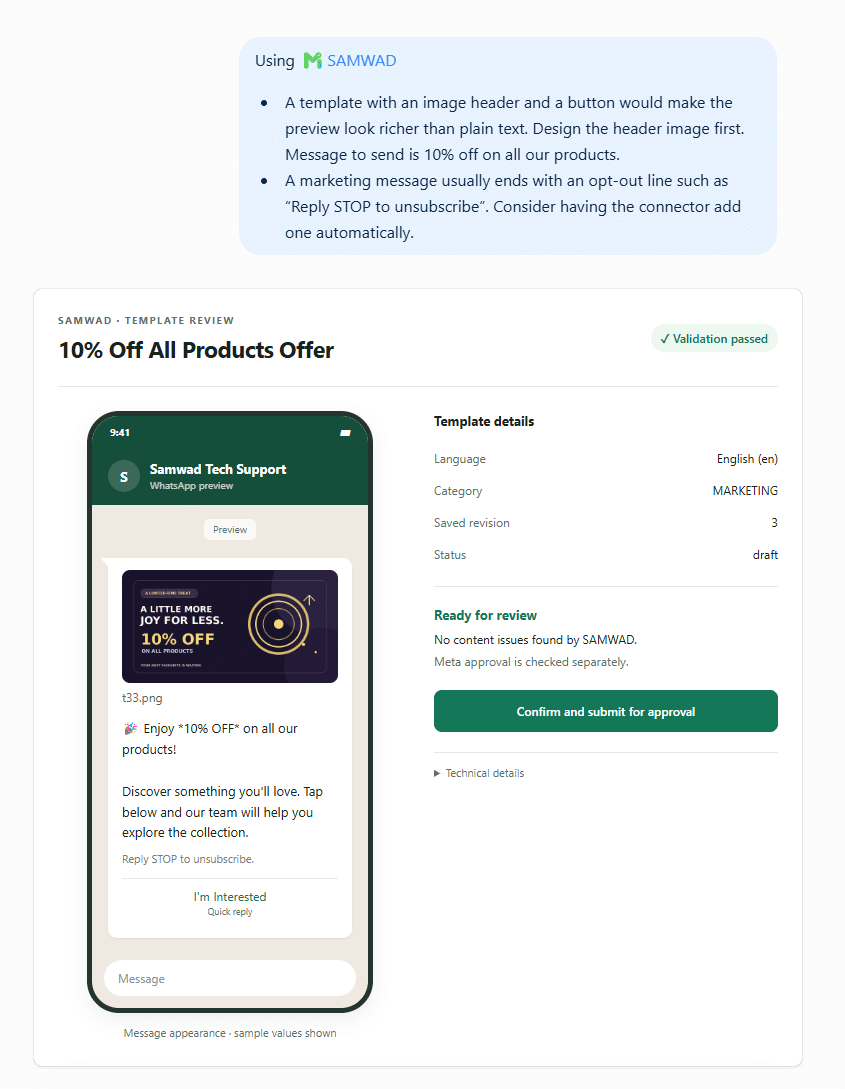
Tell ChatGPT what the message should say. It designs the template, picks a category, checks it against WhatsApp’s rules and shows you the review card before anything goes to Meta.
- Image header, buttons and opt-out line when you ask for them
- Category chosen and checked against WhatsApp’s rules
- Submitted to Meta only after you confirm
Results
Ask how a campaign did
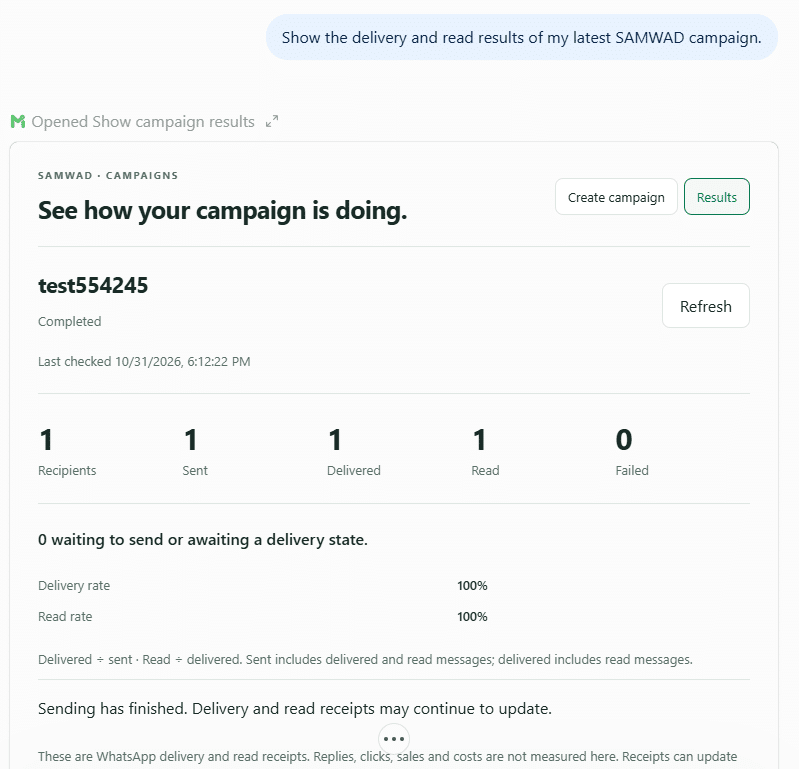
ChatGPT pulls the numbers from SAMWAD: who received the campaign, what was delivered and read, and what failed. Ask again later and the figures refresh as WhatsApp receipts come in.
- Recipients, sent, delivered, read and failed
- Delivery and read rates
- Failure reasons for individual messages
Setup
Connect SAMWAD in ChatGPT
- Open Apps in ChatGPT
Search for SAMWAD in ChatGPT’s apps.
- Sign in
Connect it to your SAMWAD account. ChatGPT can only work inside the account you sign in to.
- Start asking
Mention SAMWAD, like “In my SAMWAD account, show me my contact groups.”
You need a SAMWAD account (start a free trial) and a ChatGPT account that can use apps.
Prompts that work
Things to ask ChatGPT
No WhatsApp jargon needed. Ask for one job at a time and confirm each step.
Show me my contact groups and how many people are in each.Lists your groups with counts.
Create a marketing template for our winter sale with an image and a Shop now button.Designs it, checks it and shows the review card.
Send the winter sale template to the Repeat buyers group tomorrow at 11 am.Builds the campaign, counts who will receive it, and schedules it when you confirm.
How did yesterday’s campaign do?Shows sent, delivered, read and failed, with rates.
Why did some messages fail?Lists the failure reasons and suggests what to fix.
Summarise my chats with Rahul from this week.Finds the conversations and gives you the short version.
You stay in control
ChatGPT shows you before it sends
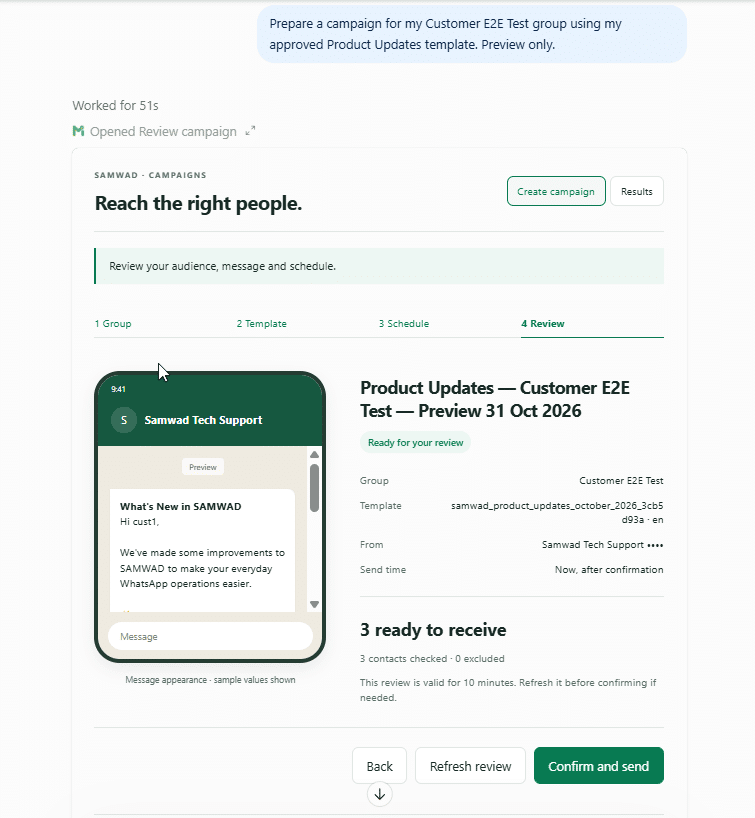
In the campaign screenshot above, nothing goes out until you click Confirm and send. The same applies to template submissions.
- Nothing goes out without you
Templates are submitted to Meta and campaigns are sent only after you confirm in the chat.
- Your account, your rules
The assistant works only inside the SAMWAD account you signed in to. WhatsApp’s opt-in and template rules still apply.
- Everything stays in SAMWAD
Templates, groups, journeys and campaigns created from a chat appear in the SAMWAD app for your team.
Pricing
Connect SAMWAD to your AI assistant.
Our team helps you pick the right plan and sets everything up with you. Meta’s WhatsApp charges are passed through at cost, with no markup.
FAQ
ChatGPT app FAQs
Want to see it on your own account? We’ll connect it with you on a call.
Book a demoIs SAMWAD available in ChatGPT?
Yes. SAMWAD is listed in ChatGPT’s apps. Search for it, sign in with your SAMWAD account and start asking.
Can ChatGPT send WhatsApp messages?
It can prepare and send campaigns through your SAMWAD account, but only after you confirm. It shows the audience size and a preview first.
Can ChatGPT read my customers’ chats?
Only when you ask, and only in your own SAMWAD account. It can search past conversations and summarise them for you.
Does it work with the free ChatGPT plan?
You need a ChatGPT account that can use apps. Check your ChatGPT plan’s app support.
Do WhatsApp’s rules still apply?
Yes. Campaigns go only to opted-in contacts, messages outside the 24-hour window need approved templates, and Meta reviews every template.
Is there a version for Claude?
Yes. See Connect WhatsApp to Claude.
Get started
Run WhatsApp from ChatGPT.
Start a free trial, add SAMWAD in ChatGPT, and send your first campaign from a chat.
Start free trialFor larger teams
Run WhatsApp at scale, on your terms.
Multiple numbers, on-prem or VPC AI, custom integrations and a priority SLA.
Book a live demo