Create WhatsApp templates with AI
Create a WhatsApp template with AI by describing it in ChatGPT or Claude. With SAMWAD connected, the assistant drafts the message, picks the category, checks it against WhatsApp’s rules and shows you a preview. It submits to Meta only when you say so.
How it works
From a sentence to a submitted template
- Describe it
Say what the message is for, who gets it and which buttons you want. “A utility template for order updates with a Track order button.”
- Review the draft
The assistant drafts the body, footer and buttons, adds variables where details change, and picks the category.
- Confirm and submit
Check the preview. Ask for changes in plain words. When you confirm, it submits the template to Meta and you can ask for its status later.
What it checks
The rules it checks before you submit
Most rejections come from a handful of mistakes. The assistant checks the template against WhatsApp’s rules as it drafts, and tells you what it changed.
Order updates and reminders are Utility; anything with an offer is Marketing; codes are Authentication. A wrong category gets re-categorised or rejected.
No variable at the very start or end of the body, and a realistic sample for each one.
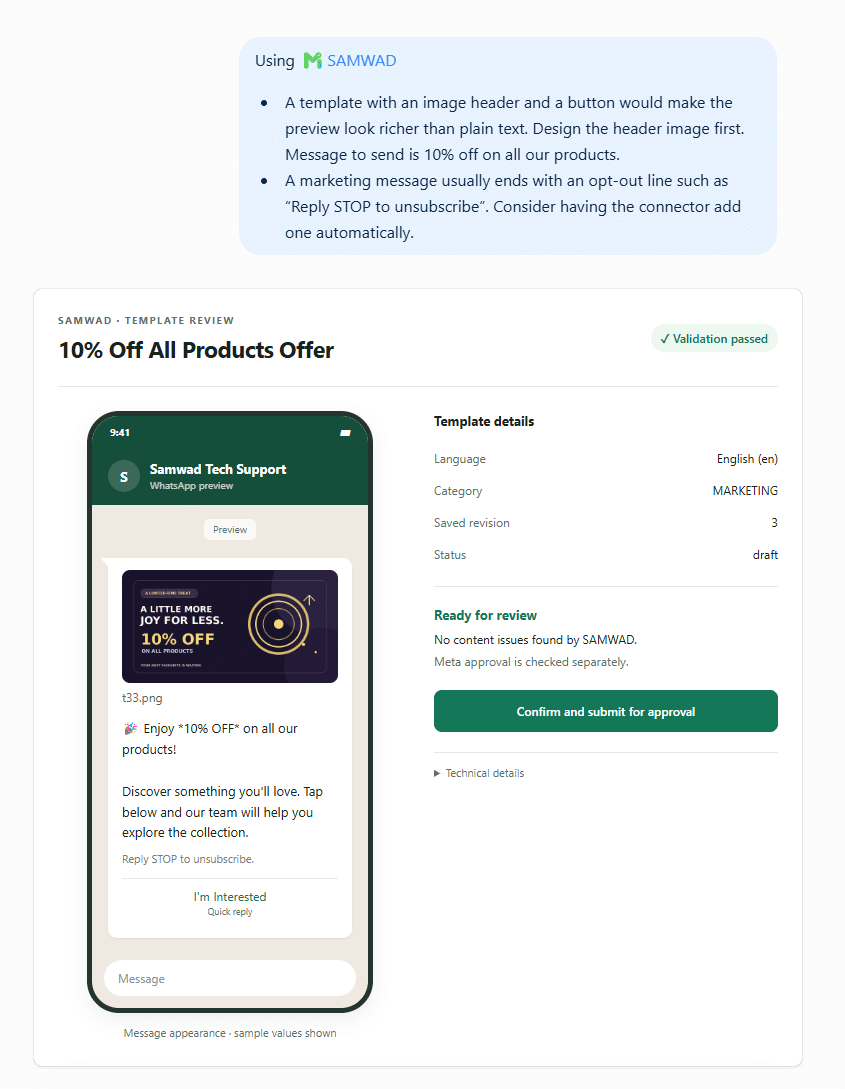
Image or document headers, quick replies and website buttons, set up the way WhatsApp expects.
Marketing templates carry a clear way to stop, which also keeps block rates down.
Prompts that work
Ask for templates like this
Create a utility template for EMI reminders with the amount, due date and a Pay EMI button.Drafts it as Utility with four variables and a dynamic payment link.
Make a marketing template for our Diwali sale with an image header and a Shop now button.Drafts it as Marketing, adds the opt-out line and asks for the image.
Translate my order_shipped template into Hindi.Creates a separate Hindi template, since WhatsApp approves each language on its own.
Which of my templates were rejected, and why?Lists them with Meta’s reasons and offers fixes.
Fix festive_20 so it passes, and show me first.Redrafts it and waits for your yes before resubmitting.
List my approved utility templates.Shows names, categories and languages.
Ready-made starting points
Start from a template that already works
Our template library has copy-ready templates with the category, variables and timing worked out. Paste one into the chat and ask the assistant to adapt it to your business.
You stay in control
Nothing is submitted without your yes
- Nothing goes out without you
Templates are submitted to Meta and campaigns are sent only after you confirm in the chat.
- Your account, your rules
The assistant works only inside the SAMWAD account you signed in to. WhatsApp’s opt-in and template rules still apply.
- Everything stays in SAMWAD
Templates, groups, journeys and campaigns created from a chat appear in the SAMWAD app for your team.
Can ChatGPT or Claude create WhatsApp templates?
Yes, with the SAMWAD connector. The assistant drafts the template in your SAMWAD account and submits it to Meta after you confirm.
Does AI get templates approved faster?
Meta reviews every template the same way. What helps is getting the category, variables and wording right first, which the assistant checks before submitting.
Can it add images and buttons?
Yes. It can set up image or document headers and buttons, and upload header media.
Can I edit the template in the SAMWAD app afterwards?
Yes. Templates created from a chat appear in the SAMWAD app like any other.
Which category will it choose?
The one that matches the content: Utility for updates about something the customer already has, Marketing for offers, Authentication for codes. It tells you why.
Get started
Write your next template in a sentence.
Start a free trial, connect SAMWAD in ChatGPT or Claude, and ask for your first template.
Start free trialFor larger teams
Run WhatsApp at scale, on your terms.
Multiple numbers, on-prem or VPC AI, custom integrations and a priority SLA.
Book a live demo