
Run WhatsApp campaigns from ChatGPT or Claude
You can send a WhatsApp campaign from ChatGPT or Claude once SAMWAD is connected. Ask for the group and the template; the assistant counts who will receive it, shows you a preview, and sends or schedules it only after you confirm. Then ask how it did.
Plan
Pick the audience by asking
Ask which groups you have, or for the people who match a description. The assistant lists your groups with contact counts and estimates how many opted-in contacts a campaign will reach.
- Lists your groups with contact counts
- Estimates who will receive the campaign
- Imports a new list and creates a group if you need one
Send
Preview, then confirm
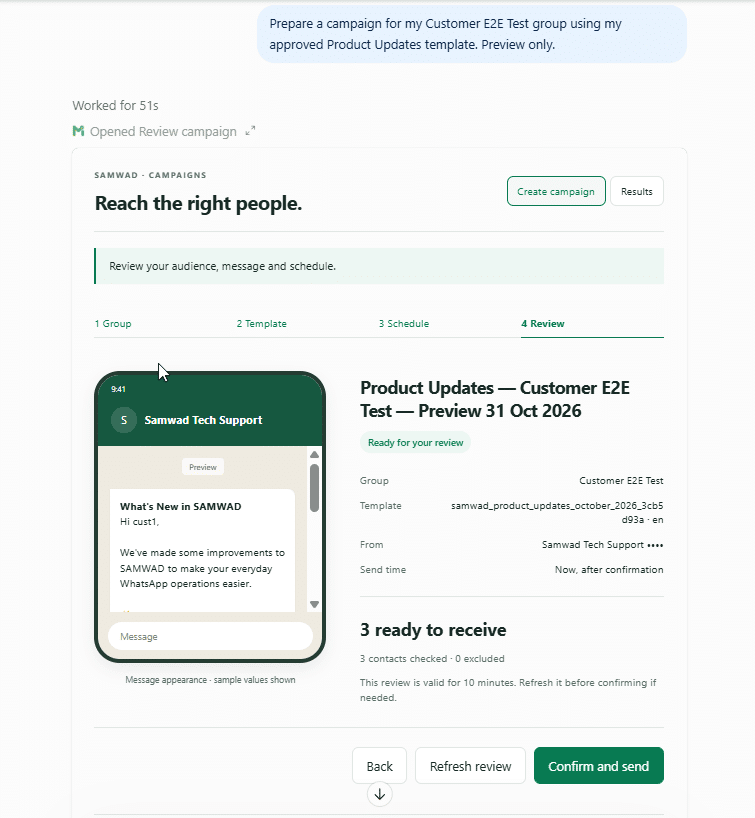
The assistant builds the campaign from an approved template and a group, then shows the review: the group, the template, the message preview and how many contacts are ready. Nothing goes out until you click Confirm and send.
- Uses your approved templates
- Shows a message preview and audience size
- Sends now or schedules it for later
Learn
Ask how it did
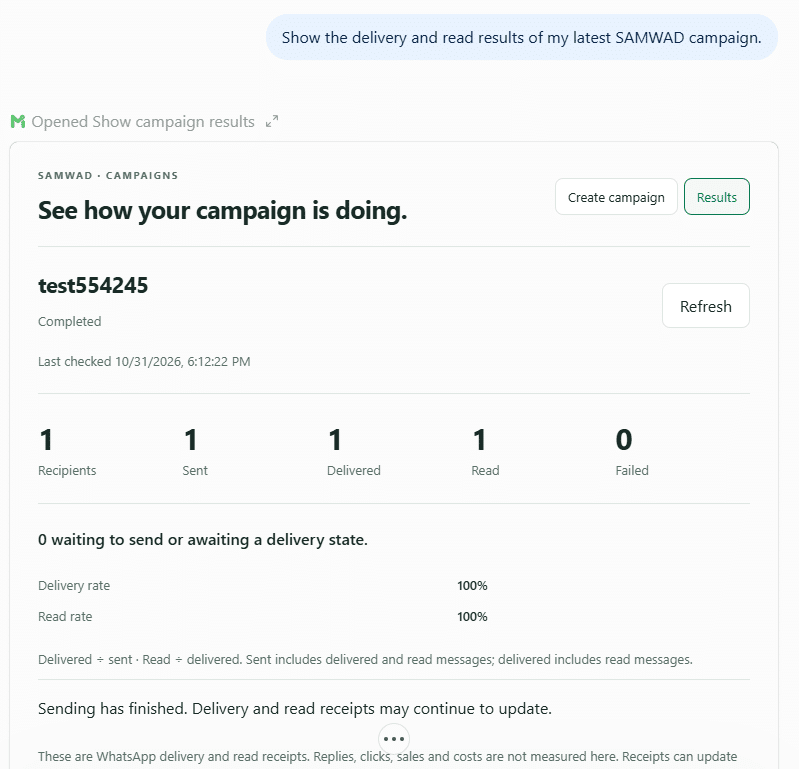
The assistant pulls the campaign results from SAMWAD and explains them. Ask why messages failed and it lists the reasons, with suggested next steps.
- Recipients, sent, delivered, read and failed
- Delivery and read rates
- Failure reasons and what to fix
Prompts that work
Campaign prompts to copy
Send the Diwali template to repeat buyers at 6 pm today.Counts the audience, previews the message and schedules it when you confirm.
Which of my groups have more than 500 contacts?Lists the groups that qualify, with their counts.
Prepare a campaign for the Expo 2026 group with the event_reminder template.Builds the campaign and shows the review before sending.
How did last week’s campaigns compare?Puts the results side by side and points out what worked.
Why did 40 messages fail yesterday?Lists failure reasons, such as numbers not on WhatsApp.
Schedule the same campaign for the Pune leads group next Monday at 11 am.Reuses the setup for a new group and time.
Rules that still apply
WhatsApp’s campaign rules don’t change in a chat
- Opted-in contacts only. Campaigns go to people who agreed to hear from you on WhatsApp.
- Approved templates. Outside the 24-hour window, every campaign uses a template Meta has approved.
- Marketing limits. Meta limits how many marketing messages one person receives, so some may not be delivered. See WhatsApp’s marketing message limits.
- Meta’s charges. Each delivered template is charged by Meta. SAMWAD passes the charges through at cost; see pricing.
You stay in control
Every send needs your yes
- Nothing goes out without you
Templates are submitted to Meta and campaigns are sent only after you confirm in the chat.
- Your account, your rules
The assistant works only inside the SAMWAD account you signed in to. WhatsApp’s opt-in and template rules still apply.
- Everything stays in SAMWAD
Templates, groups, journeys and campaigns created from a chat appear in the SAMWAD app for your team.
FAQ
AI campaign FAQs
Want to run your first campaign from a chat? We’ll do it with you on a call.
Book a demoCan ChatGPT send WhatsApp campaigns?
Yes, with the SAMWAD app connected. It prepares the campaign, shows the audience and preview, and sends only after you confirm.
Can Claude schedule a WhatsApp campaign?
Yes. Ask for the time and Claude schedules it in SAMWAD once you confirm.
Will it send to contacts who haven’t opted in?
No. Campaigns go only to opted-in contacts, and the assistant tells you how many will receive it.
Can it use templates that aren’t approved yet?
No. Campaigns use approved templates. The assistant can draft and submit a new one, then use it once Meta approves it.
Where do I see the campaign afterwards?
In the SAMWAD app, with your other campaigns. You can also ask the assistant for results.
Get started
Plan, send and review from one chat.
Start a free trial, connect SAMWAD in ChatGPT or Claude, and run your first campaign.
Start free trialFor larger teams
Run WhatsApp at scale, on your terms.
Multiple numbers, on-prem or VPC AI, custom integrations and a priority SLA.
Book a live demo